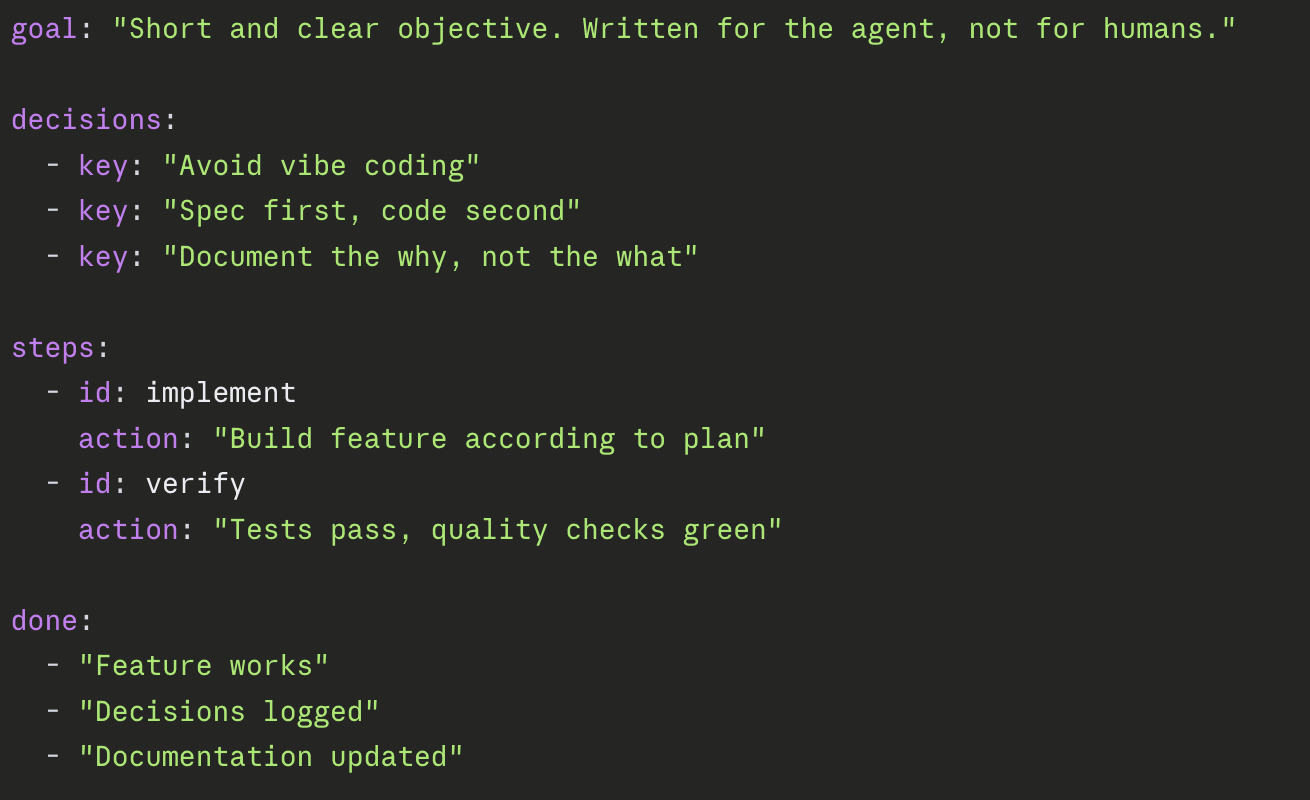
Specification-First Agentic Development optimizes working with coding agents via treating specifications as the main artifact.
Coding agents forget, misinterpret, and lose context. While CLAUDE.md combined with skills improve the behavior, it is not sufficient.
TL;DR
When wanting to keep track about feature implementation with any AI as an assistent, have a look at the github repository. Install Specification-First Agentic Development as a Claude Plugin or for any other AI.
Context.yaml
A YAML file that captures the project’s identity and state. Compressed in a. yaml file instead of md which leads to saving token by factor 10. Lives at .agentsmith/context.yaml. The agent reads it at the start of every session.
Main sections:
meta:name, version, type, purpose in one sentencestack:runtime, language, infrastructure, testing tools, SDKsarch:architectural style, patterns, layersbehavior:pipelines, triggers, stepsquality:language rules, hard limits, naming conventionsintegrations:external systems (AI providers, Git, tickets, Slack…)statesdone:chronological record of what’s already built (p01, p02)active:current phase(s) to implement (p01, p02)planned:queued phase(s) that wait for being implemented (p01, p02)
Objective: The agent gets a compressed, short, non-redundancy picture about the project to work with key/value style, highly structured.
Phase spec
A yaml file describing one unit of work. Lives at .agentsmith/phases/{planned|active|done}/p{NN}-{slug}.md. Each phase has its own file. The file moves through three directories as work progresses:
phases/
  planned/   # spec written, queued up
  active/    # currently being worked on (convention: one at a time)
  done/      # completed, archived as history
Prefined content (via schema):
- Goal: what this phase achieves, in 2-3 sentences
- Requirements: what has to exist when done
- Design: concrete architectural choices (interfaces, file paths, method signatures)
- Files to create / Files to modify: explicit list
- Definition of Done: checklist: build passes, tests pass,
context.yamlupdated, decisions logged
The objective: A phase spec is written for the agent, not for humans to read at length. Define your spec with the agent and ask for creation of this phase in combination of the schema or simply use the claude plugin with /createspec. The why goes in decisions.md, the what goes here.
Lifecycle in practice (all captured in claude plugin via commands):
- Idea arrives: write a phase spec, drop it in
planned/ - When ready to work on it: move to
active/ - Agent reads the spec, executes, writes tests, updates
context.yaml - After commit: move to
done/, phase is recorded instate.done
Coding-principles.md
A markdown file with the rules code in this project must follow. Lives at .agentsmith/coding-principles.md. Is read before every code change. As humans will most probably write and maintain this file after is have been generated, this file is not a compressed information file put in yaml.
Typical sections:
- Language rule: which language code and comments are written in
- Hard limits: max method length, max class length, one type per file
- Project structure: which folders are allowed at which level
- SOLID / patterns: architecture principles for this project
- Naming conventions: PascalCase, camelCase, I-prefix for interfaces, Async-suffix
- Testing: AAA pattern, naming scheme like
{Method}_{Scenario}_{Expected} - What NOT to do: concrete anti-patterns (no god classes, no magic values, no empty catch blocks)
Decisions.md
A markdown file where every architectural, tooling, or implementation decision gets recorded the moment it’s made. Lives at .agentsmith/decisions.md. As well written in markdown for human readability.
# Decision Log

## p67: API Scan Compression
- [Architecture] LinkedList over List for pipeline — runtime insertion of commands required, append-only List wouldn't support cascading commands
- [Tooling] DuckDB over direct OneLake access — RBAC setup too complex for first run, DuckDB reads Parquet natively
- [TradeOff] FileSystemWatcher over polling — polling would be more robust but FSW is sufficient here, conscious choice of simplicity over robustness

## p68: API Finding Location
- [Architecture] ...
Grouped by phase. Categories (Architecture, Tooling, Implementation, TradeOff) sits inline as a tag.
- The key rule: Reason why, not what. Not “DuckDB is used” but “DuckDB over direct OneLake: RBAC setup too complex for first run.”
- Why this matters: Runs capture what happened. Decisions capture why things were decided the way they were. With AI-generated code, that knowledge is exactly what’s missing. A developer who wrote their own code carries this in their head and probably would never write it down.
decisions.mdcloses that gap automatically.
Claude Code Plugin
The fastest way to get started is the Claude Code plugin. Install it and you get 6 skills that guide you through the entire methodology. There are three options.
1. Official marketplace listing
Plugin is submitted and is pending approval by Anthropic. Once approved, install will be a single command:
/plugin install spec-first2. Install via custom marketplace
# In Claude Code — add the marketplace and install:
/plugin marketplace add holgerleichsenring/specification-first-agentic-development
/plugin install spec-first@specification-first-agentic-development
3. Local install
git clone https://github.com/holgerleichsenring/specification-first-agentic-development.git
claude --plugin-dir /path/to/specification-first-agentic-development
Then in Claude Code:
| Skill | What it does |
| /bootstrap-project | Set up the methodology in your project |
| /create-phase | Plan a new feature or task |
| /execute-phase | Implement the active phas |
| /log-decision | Record an architectural decision |
| /update-project | Sync with newer methodology versions |
| /spec-first-workflow | Overview of the full methodology |
No framework required. The plugin is an optional convenience layer, the methodology works with any AI agent, the plugin just makes it easier with Claude Code.
Specification-First Agentic Development can be found in github repository It’s completely free on MIT.
What to see it in action? Have a look onto Agent Smith. The basic idea for the methodology was built while writing this project.